
888PKR Login | Access Your Account Easily
The 888PKR Login process allows registered users to access their accounts and use available features inside the application. After creating an account, users can sign in using their registered details and manage their profile, wallet, and other account options.
888PKR login process is simple and takes only a few steps. Users need their registered information and a stable internet connection to access their account.
If you are facing problems while trying to login 888PKR Game, this guide explains the complete process and common solutions.
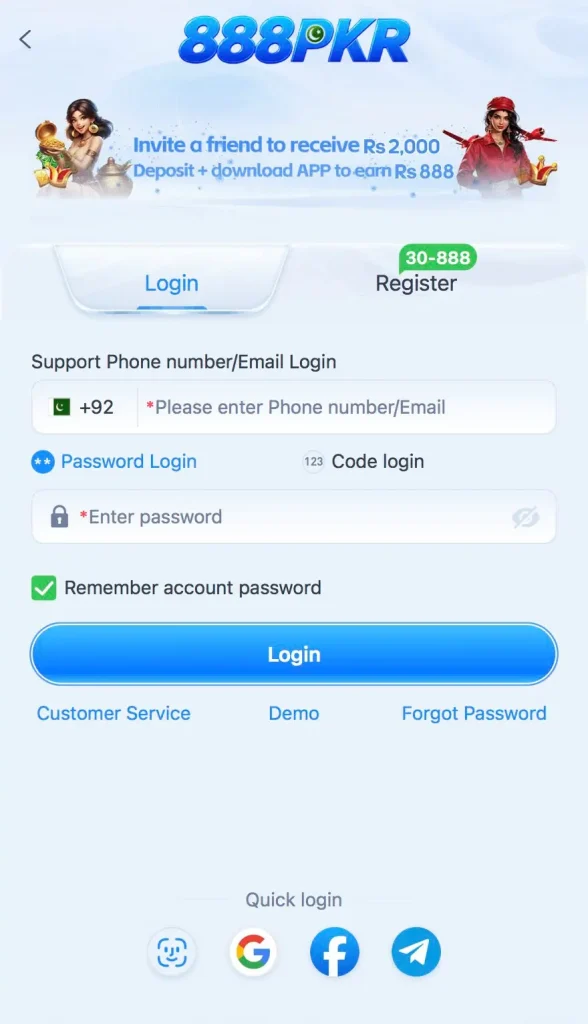
How to Login to 888PKR Account?
Follow these steps to access your account:
Step 1: Open 888PKR Application
Launch the latest version of the 888PKR app on your Android device.
Make sure your internet connection is working properly.
Step 2: Select Login Option
On the home screen, click on the Login button.
You will be redirected to the account access page.
Step 3: Enter Your Account Details
Add your registered information:
- Username or mobile number
- Password
Check your details carefully before continuing.
Step 4: Access Your Account
After entering correct information, click the login button.
You will be redirected to your account dashboard where you can access available features.
888PKR Login Requirements
Before signing in, make sure you have:
| Requirement | Details |
|---|---|
| Registered Account | Required |
| Login Details | Username/Password |
| Internet Connection | Stable connection |
| Application Version | Latest available version |
Forgot 888PKR Login Password?
If you cannot remember your password, follow these general steps:
- Open the login page.
- Select the password recovery option.
- Enter the required account details.
- Follow the recovery instructions.
- Create a new password if required.
Always keep your updated account information to avoid access problems.
Common 888PKR Login Problems and Solutions
Incorrect Login Details
One common reason users cannot access their account is entering incorrect information.
Solution:
- Check your username or mobile number.
- Re-enter your password carefully.
- Make sure there are no typing mistakes.
App Not Opening During Login
Sometimes login problems happen because of technical issues or internet problems.
Solution:
- Check your internet connection.
- Restart the application.
- Clear temporary app data.
- Update to the latest version.
Account Access Issue
If you cannot access your account after checking your details:
Solution:
- Use available account recovery options.
- Check if your account information is correct.
- Contact support through available channels.
Tips to Keep Your 888PKR Account Secure
Follow these steps to protect your account:
- Use a strong password.
- Do not share your password with anyone.
- Avoid logging in through unknown links.
- Download updates from trusted sources.
- Log out from shared devices.
Why Login to 888PKR?
Manage Your Account
After login, users can access their personal account dashboard and available features.
Check Wallet Information
Registered users can view wallet-related information and manage available transaction options.
Access Platform Features
Login provides access to the features connected with your personal account.
Frequently Asked Questions About 888PKR Login
How do I login to 888PKR?
Open the 888PKR app, select the login option, enter your registered details, and access your account.
Why can’t I login to my 888PKR account?
Login problems may happen because of incorrect details, internet issues, or application errors. Check your information and try again.
Can I login to 888PKR from another device?
Users should follow platform rules when accessing their accounts from different devices.
What should I do if I forget my 888PKR password?
Use the available password recovery option to reset your account access.
Do I need to register before 888PKR Login?
Yes, users need a registered account before accessing login features.